From the blog
The yoga studio website class schedule CMS gap - and the agency model that closes it

You probably think this is going to be about MindBody. It's not. Your booking platform is fine - the schedule loads, the credit card processes, the waitlist works. The problem is the website wrapped around it: the stale teacher bio for someone who left in October, the workshop you're hosting next month buried three clicks deep, the 30-day challenge landing page you've been meaning to build since January. If you're searching for a yoga studio website class schedule CMS- and, honestly, for a yoga studio website designer who will keep shipping changes after launch - keep reading.
The widget is current. The rest of the site isn't.
Walk through a typical small studio's web stack and you'll find the same pattern. The schedule embed - MindBody, Mariana Tek, Punchpass, Momence, whatever you settled on - is up-to-the-minute because your manager is in there daily. New teachers get added the moment they're hired. Class names match what's on the mat.
Then look at the rest of the site. The "Our Teachers" page still lists someone who finished her 200-hour and moved out of town last fall. The homepage hero still advertises the spring equinox workshop. The intro offer language says "$49 for two weeks" but you raised it to "$59 for three weeks" in March. The sliding-scale community class isn't mentioned anywhere a new student would actually find it. The bio for your senior teacher is two paragraphs of placeholder Lorem because nobody got around to writing it.
None of this is a booking-platform problem. It's a content-management and ownership problem. In our experience, this is the single biggest reason new students bounce from the homepage without ever hitting the schedule embed. Book a 20-minute walkthrough and we'll show the gap closed live on a studio site that looks a lot like yours.
Why studios end up with a yoga web design agency they barely talk to
The reason isn't laziness. Most studio owners we talk to teach ten-plus classes a week, run teacher trainings, manage a small front-desk team, and try to keep their own practice alive. The website was built by a friend-of-a-friend three years ago on a page builder that takes forty-five minutes of fighting just to swap a headshot. Or it was built by a generic yoga web design agency that handed over a Wix or Squarespace login at launch and disappeared. Updating a teacher bio means logging in, finding the right page, hoping the block layout doesn't collapse, re-uploading the image at the right aspect ratio, and then realizing the new headshot is now stretched in the footer carousel.
So the schedule stays current and the rest of the site doesn't. Industry averages we see across small wellness studios: roughly 60-70% of a studio's web traffic visits at least one non-schedule page - teachers, workshops, about, intro offer - before booking. If those pages are stale, you're losing students before they ever see the embed. And if your fitness studio marketing agency isn't the same team that ships the website updates, every small fix becomes a three-way email thread.
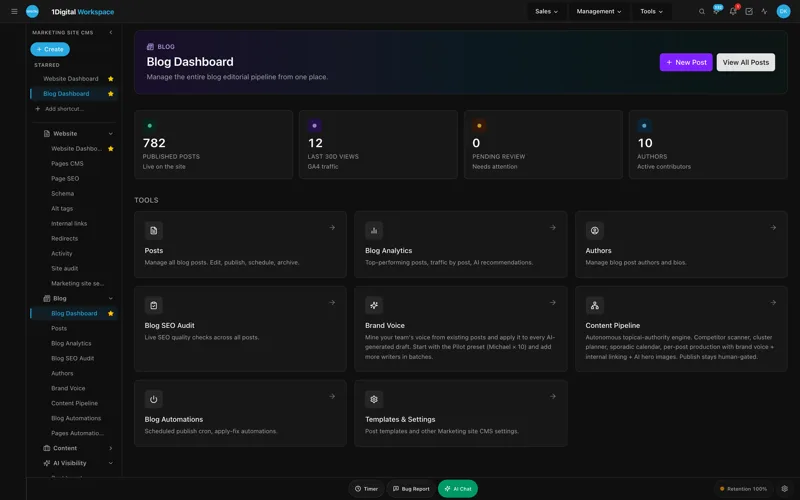
This is where Workspace CMS comes in. The pitch is simple: a managed platform that runs your studio's site, plus an in-house team of designers, developers and SEOs that ships every change you ask for. You send a ticket - "please swap Maya's bio for the new one, here's the headshot, also add a Yin teacher named Ravi" - and we ship the change. No page-builder fighting. No HTML. Real humans. Real AI tools. Real changes shipped fast. The full feature stack is built for exactly this workflow.
What a yoga studio website class schedule CMS actually does in a month
Here's what a typical month looks like for a small studio on Workspace CMS:
- Three teacher bios updated (one new vinyasa sub, one yin teacher's training credentials, one departing restorative teacher removed) - drafted in the Page Editor + SEO Sidebar so the meta title, OG image and JSON-LD Person markup get set in the same pass.
- One workshop landing page built for a Saturday sound bath - title, description, date, price, booking link. The Structured Data Editor tags it as a JSON-LD Event with live validation so it's eligible for Google's events results before it ships.
- A 30-day challenge landing page added in early January, then taken down in February - built and tracked in the Content Pipeline Board from idea to publish to retire, so you don't lose track of which version is live.
- Intro offer price updated site-wide (homepage hero, pricing page, footer band) - one ticket, every surface touched.
- Five new alt tags written for studio photos using AI Image Alt-Tag Suggestions, brand-voice-tuned so they don't read like a stock-photo caption.
- One redirect added through the Redirect Manager because you moved "/workshops/winter-reset" to "/workshops/january-reset" and don't want to break the Instagram link from three weeks ago. Conflict detection catches the old 302 someone set up two years ago and quietly forgot.
None of those are big projects. All of them used to mean either bothering the friend-of-a-friend or letting it sit. With managed CMS, you stop choosing between "the schedule is current" and "the rest of the site is current." Both are current. The managed-change workflow is documented step by step on the marketing site if you want to see how a ticket moves from inbox to live edit.
UNLIMITED MANAGED CHANGES
Send a ticket. We ship the change.
Every Workspace CMS plan includes unlimited managed CMS edits. Essentials ships in 4 business days. Growth ships in 2. Premium ships in 12-24 hours. No per-edit fees. No "open a Jira" overhead. Every new teacher bio, every workshop landing page, every 30-day challenge launch, every intro-offer price change - describe what you need and our team builds it on your live site.
Teacher bios and workshop descriptions, without the blank-page problem
The other thing studios get stuck on is writing. You hire a new teacher. She sends a five-bullet email about her training lineage, her style, what she loves about teaching. That's not a bio. Turning it into one takes an hour, and you don't have an hour today.
Workspace CMS includes an AI Blog Generator and AI credits you can spend on exactly this kind of work. Paste her email, tell it the bio should sound warm and grounded (not corporate), get a first draft you can edit in two minutes. Same workflow for workshop descriptions, intro-offer copy, the "What to expect for your first class" page every studio knows it needs and somehow never finishes, and the 30-day challenge launch sequence. The output isn't generic GPT mush because Theme & Brand Voice locks the model to your studio's tone - the warm, grounded, slightly-irreverent voice you've spent five years building on Instagram, not the cheerful exclamation-point voice every other AI tool defaults to.
Essentials ships with 200 AI credits a month; Growth ships with 1,000. For most single-location studios, 200 is plenty. The page-level SEO sidebar deep-dive walks through how the bios, workshops and class-style pages all get their meta titles, descriptions and schema written in the same flow.
Pricing: what fits a yoga studio
Workspace CMS has three tiers. Here's how we'd map them to a studio:
- Essentials - $89/month. Right for a small studio that handles its own bookings. Unlimited managed CMS changes with a 4-business-day SLA, AI Blog Generator, AI Visibility Tracker (5 prompts), 200 AI credits, all SEO controls - redirects, robots, llms.txt, schema, sitemap. Vercel hosting and SSL included. If it's mostly you plus one or two teachers, this is your tier.
- Growth - $199/month. Where multi-teacher studios land. 2-business-day SLA on edits, same-business-day on anything blocking signups. 1,000 AI credits (enough for monthly blog posts, workshop pages, and bio refreshes). 15-prompt AI Visibility Tracker across ChatGPT, Claude, Perplexity, and Gemini with weekly digests. Google reviews built into your site are included, which alone is worth the upgrade for most owners.
- Premium - $449/month. White-glove. 12-24 hour change SLA, 2,500 AI credits, daily AI Site Audit. Right if you're running three locations or a teacher-training brand with a full content calendar. The Multi-Location Storefront module - store locator with map, ZIP search, per-location hours and schedule embeds - is included here, so a Brooklyn studio adding a Hudson Valley retreat outpost gets a real per-location experience instead of a single "locations" paragraph.
You can compare the full tier ladder if you want the side-by-side. Honest answer for most studios reading this: start at Essentials, move to Growth when you have three or more teachers or workshops monthly, jump to Premium when you open the second location or launch a teacher-training brand.

SEO and AEO: how a yoga studio website company gets you found
Most studios show up for their own brand name and basically nothing else. The keywords that drive new students - "vinyasa class near me," "prenatal yoga," "intro offer yoga," "restorative" plus a neighborhood - are competitive, and ranking requires the kind of page-level SEO control most page builders don't really give you. Picking a yoga studio website company that treats SEO as an afterthought is how studios end up invisible in search even after a $15,000 site rebuild.
Workspace CMS handles this by default. Page-level SEO control for meta, OG, canonical and robots lives in the Page Editor SEO Sidebar, right next to the body content where you're already working. The Structured Data Editor ships workshop pages as JSON-LD Event and teacher pages as JSON-LD Person, both with live validation before publish. Automated Internal-Link Rules feed your blog posts into your class-style pages on the anchors you choose - "prenatal," "yin," "vinyasa," "restorative" - without you wiring every link by hand. The Alt-Tag Sweep rewrites years of bad alt text across the photo library in a single pass.
On the AEO side, the AI Visibility Tracker tells you whether ChatGPT, Claude, Perplexity and Gemini actually mention your studio when someone asks for the best studio in your area, and the auto-regenerated llms.txt file gives those models a clean map of your site. Built by 1Digital, a 15+ year SEO agency and Google Partner - so the defaults aren't guesses. Other studios who've gone through this rebuild are in the live demo gallery and the case-study collection, including teacher-training brands and multi-location wellness studios.
The yoga studio website class schedule CMS gap - and the FAQ
Does Workspace CMS replace MindBody, Mariana Tek, or Punchpass?
No, and it shouldn't. Those platforms handle scheduling, payments, waitlists, and student records, and they do it well. Workspace CMS is the website around the schedule embed. You keep your booking platform; we make the rest of the site stop being the weakest link.
Can you embed our existing schedule widget?
Yes. Every major booking platform offers an embed snippet - iframe, JavaScript widget, or a hosted booking page. We drop it into whatever page you want it on, style the wrapper to match the rest of the site, and you're done. Most studios put it on a dedicated /schedule page with a secondary embed in the footer.
How fast does a typical change actually ship?
On Essentials, the SLA is 4 business days but most non-complex tickets ship same-day or next-day. On Growth, the SLA is 2 business days with same-business-day on anything blocking signups - like a broken intro-offer link the day before your new-year push. Most teams pick Growth for this reason.
What about our 200-hour teacher training page?
Teacher training pages are exactly the kind of long, content-heavy page that page builders make miserable. Send us the curriculum, faculty bios, dates, tuition, payment-plan terms, and we'll build the page, set up the structured data as a JSON-LD Course, and add a redirect from any old URL. Future cohort updates are just tickets.
We offer sliding-scale community classes. Can we surface those without confusing first-time visitors?
Yes. Most studios end up with a dedicated /community-class or /sliding-scale page linked from the main nav and the intro-offer page, with clear language about how the pricing works. We can also add a small footer band that calls it out site-wide. It's a five-minute ticket.
If your booking platform is current but your website isn't, the gap isn't a technology problem - it's a workflow problem and an ownership problem. Workspace CMS exists to close it. Send a ticket, we ship the change, your bios stop lying about who works there, and your next workshop stops being buried three clicks deep. Start a strategy conversation with our team- most studios launch in two weeks.
